
Kartrapport – field work on the map
For work on areas, for example snow clearing, gritting, sweeping, mowing, inspections or cleaning.
The office draws the areas on a map and starts a round when something needs to be done. Employees start and finish the work on site in the Kartrapport app. Everyone sees right away which areas are done, in progress or need to be redone.
How it works
1. Draw the areas
The office draws the areas on the map as a surface or as a stretch along the road. Each area can have a customer, zone, priority and a person responsible – and one or more steps, for example snow clearing followed by gritting.
2. Start a round
When something needs to be done, the office starts a round and states what it is for, for example snowfall or spring sweeping. The round can cover all areas or only certain lists.
3. The work is done on site
The employee taps Starta arbete (start work) at the area and Klart (done) when finished. If the area has more steps, the app offers to continue with the next one. The map updates right away for everyone.
In the app: see what needs doing and get there
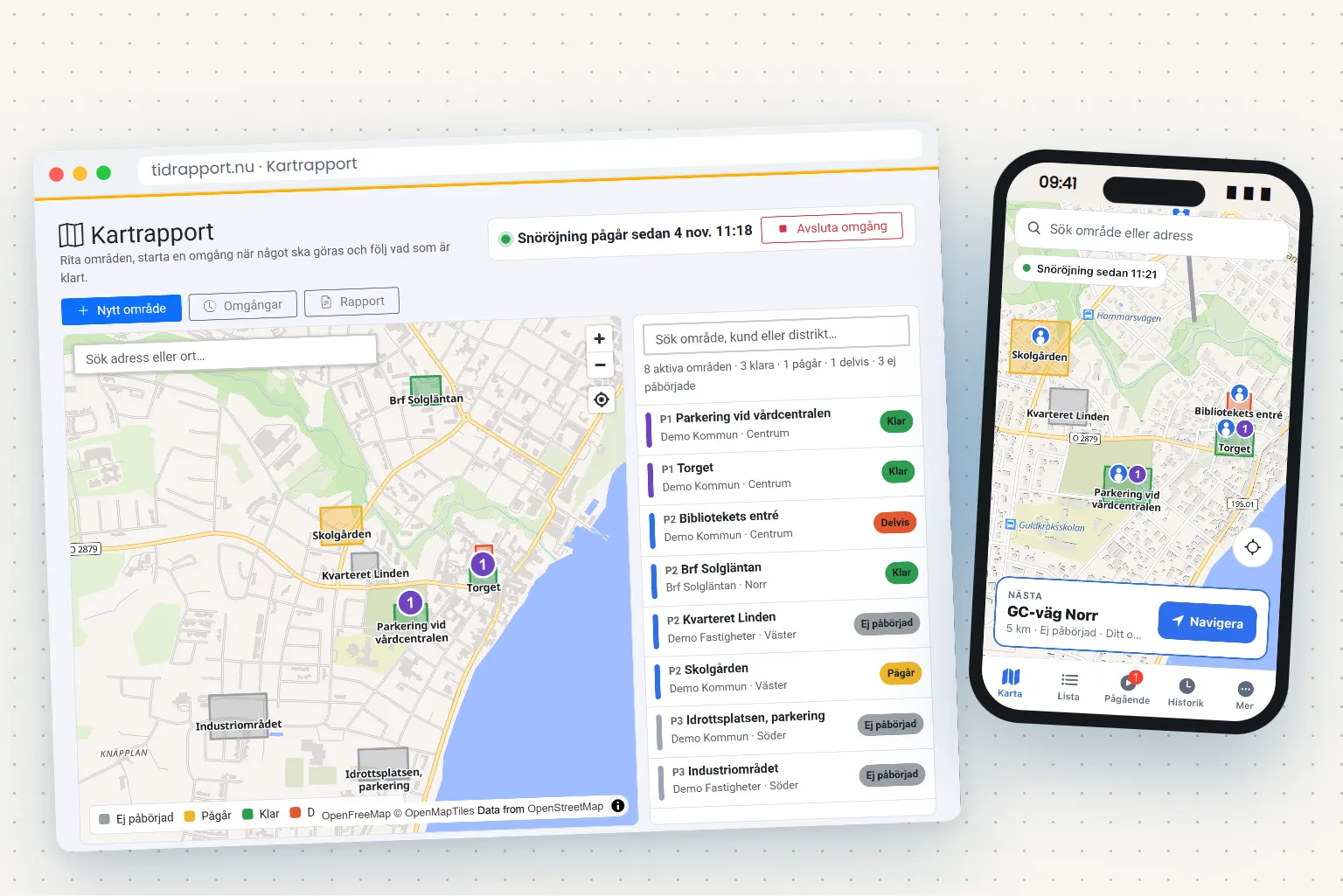
- The map shows where things stand. Areas are coloured by status, your own are marked and top-priority areas stand out.
- Next area and navigation. The app suggests which area is next and opens directions in the phone's map app.
- Leave the area with a reason. If you can't finish, or something prevents the work, you give the reason so the next person knows where to continue.
- More about the area. The description, the steps and the notes – with images and PDF files – are on the area's own page. Tap a point on the map to read the note that belongs there.
- Your own notes. Employees write what the next person needs to know, mark it as a warning and add an image. When finishing, a short note about what was done can be added.
- List with distances. All areas with status, priority and distance. Show only your own, the nearest or a certain list.
- Works without coverage. What you report is saved on the phone and sent when the network is back.
- iPhone and Android. The Kartrapport app is available on the App Store and Google Play. Employees get their account from their employer. The app is in Swedish.
At the office: overview and records
- Status in real time. See right away which areas are done, in progress or not started – and, for areas with several steps, how many are done.
- Notes on the area. Write what the employees need to know, place it as a point on the map and attach images or PDF files, for example a maintenance plan. The notes stay from round to round.
- Lists. Group the areas into lists, for example one per machine, customer or neighbourhood, and start a round for only some of them.
- Needs to be redone. Mark an area, or just one of its steps, to be redone in the same round.
- Rounds afterwards. Every round is saved with its visits. Corrections are logged with who, when and why.
- Report in Excel or PDF. Choose period, areas and what the rounds were for, for example as a record for your customer.
Add-on to Tidrapport
If you already use Tidrapport, Kartrapport is activated as an add-on. Employees log in to the app with the same username and password as in Tidrapport. No new users need to be created. The add-on costs 249 SEK/month.
Or as a service of its own
Kartrapport also works standalone for companies that don't use Tidrapport. You then get a subscription with Kartrapport only, from 300 SEK/month.
Want to see how it works?
Kartrapport is new and we are currently running a pilot together with a customer. Get in touch and we'll show you how it could work for you.